MSN Group List v2.0
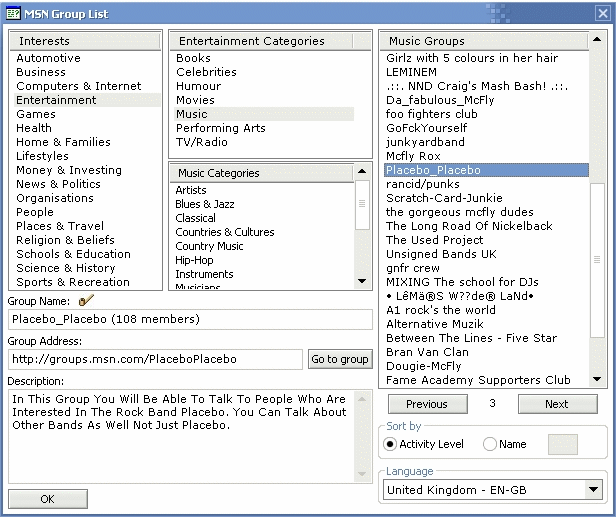
First choose your language, then select which categories you want and then find a group that interests you, click the group for more details and click "Go to group" to check it out.
Page 3 of 28
First choose your language, then select which categories you want and then find a group that interests you, click the group for more details and click "Go to group" to check it out.
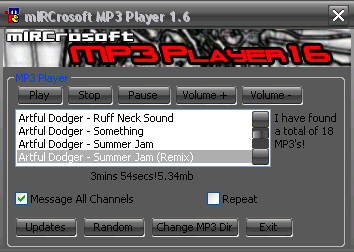
This MP3 Player will allow you to easily play your favourite mp3's. Double click a song to play it, gives you the option to change the mp3 directory, show a message. A neat little mp3 player.
Use this simple script to display your WhatPulse stats as well as update them.
A login bot for your channel to help stop the annoying users from interrupting your chat. All users are required to login before being able to speak in the channel. (Mode +m required) The user will first have…
A user-friendly helpdesk bot for your help channel. It has automatic user listing like the MSN Helpdesk did (who's next in line). It has it's own FAQ (whisper !FAQ). You can add/delete things from the FAQ also.
An upgrade of the previous version. Word Frenzy 4.0 includes the option to play as part of teams. Word Frenzy is a fast paced word game. The script selects a random 10 letter word from it's 10 Letter Wordlist…
An add on to make adding on text responses simpler. Basically you just input the command and what ever you want it to say when the command is entered. it holds up to 50.
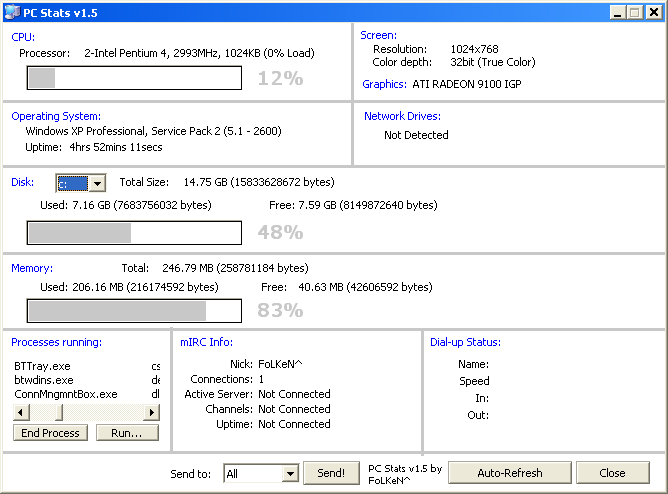
PCStats is an addon a bit different in the looks from other system stats addons.The dialog has been MDX-ed and it looks very nice.The addon contains all info a regular system stats addon would.Most of the info…
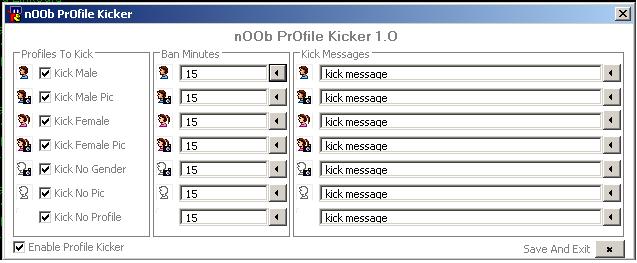
kicks users without profiles or profile types you choose. you can set your own ban mins and kick messages for each type.
Basically is a simple userlist dropin dialog... created for easy use.. please read the readme so it works right though, i dont want e mail about how it doesnt work and you didnt read the readme...SO.. Thanks