About this file
Overview
This is the first beta release of ircWx-Conn and should be used for testing. While the project has gone through extensive development and testing, this release is intended to help find any remaining bugs, compatibility issues, or areas that need improvement before a final public release.
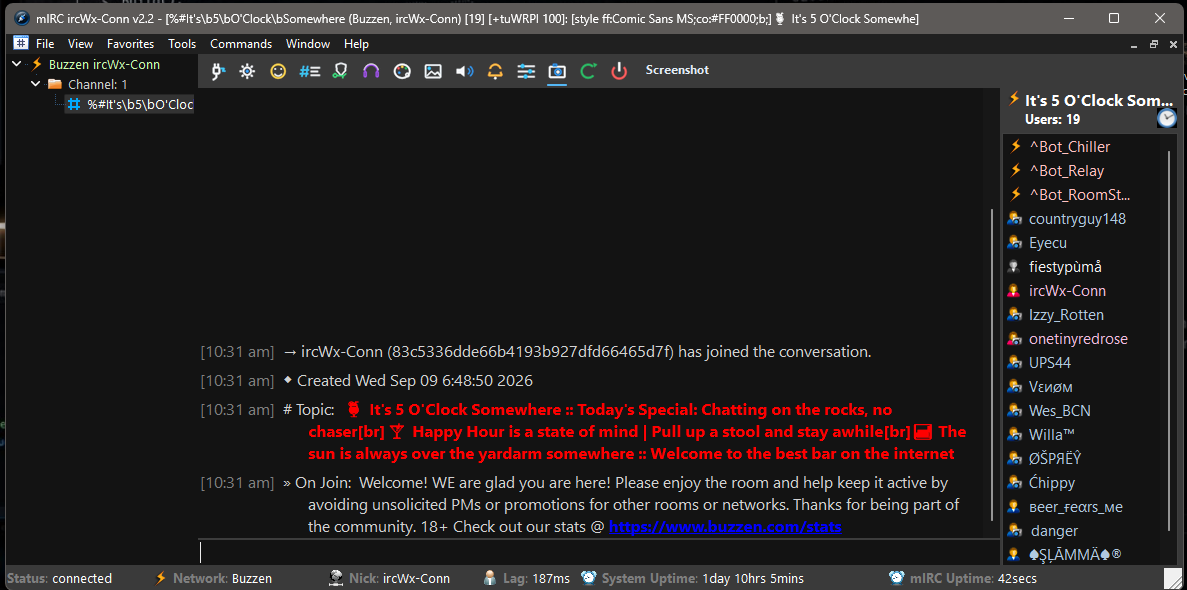
ircWx-Conn is a modern mIRC-based client designed specifically for connecting to IRCWX networks such as Buzzen. The goal of the project is to bring the familiar power and flexibility of mIRC together with the features people expect when using IRCWX.
ircWx-Conn handles the IRCWX connection and protocol behind the scenes while providing a cleaner, more modern interface for everyday chat. It includes support for IRCWX room and user modes, whispers, room management, user status and ranks, Buzzen emoticons, room listings, notifications, and many of the other features needed to properly interact with an IRCWX network.
The project also includes a built-in Webchat view, giving users another way to follow and interact with conversations while still taking advantage of the features available through mIRC.
A lot of attention has been put into making ircWx-Conn usable by both newer users and experienced mIRC users. Dialogs and menus have been modernized, common tasks have been made easier to access, and the client includes built-in tools such as room management, screenshots, an action logger, customizable colors and fonts, and update support.
ircWx-Conn still remains mIRC at its core. Experienced users can continue using normal aliases, remotes, popups and scripts just as they normally would.
Add-on Support
ircWx-Conn also includes an Add-on Manager for people who want to extend the client.
Add-ons are normal mIRC scripts rather than a proprietary scripting format. Users can install supported addons through the Add-on Manager, create their own, or simply load regular mIRC scripts manually if they prefer. The Add-on Manager is there to make organizing, loading, unloading and reloading addons easier without taking away the flexibility mIRC users are accustomed to.
Beta Testing
Since this is the first public beta, feedback is encouraged. If you run into something that doesn't work correctly, find something confusing, or discover an IRCWX feature that isn't behaving as expected, please report it so it can be investigated before the final release.
A full help guide covering setup, connecting, features and general usage is available here:
ircWx-Conn Help Guide:
https://tg007.net/ircwxconn/helpguide/
Version: 3.0 Beta
Platform: mIRC / Windows
Designed for: IRCWX networks, including Buzzen.com
ircWx-Conn is a modern mIRC-based client designed specifically for connecting to IRCWX networks such as Buzzen. The goal of the project is to bring the familiar power and flexibility of mIRC together with the features people expect when using IRCWX.
ircWx-Conn handles the IRCWX connection and protocol behind the scenes while providing a cleaner, more modern interface for everyday chat. It includes support for IRCWX room and user modes, whispers, room management, user status and ranks, Buzzen emoticons, room listings, notifications, and many of the other features needed to properly interact with an IRCWX network.
The project also includes a built-in Webchat view, giving users another way to follow and interact with conversations while still taking advantage of the features available through mIRC.
A lot of attention has been put into making ircWx-Conn usable by both newer users and experienced mIRC users. Dialogs and menus have been modernized, common tasks have been made easier to access, and the client includes built-in tools such as room management, screenshots, an action logger, customizable colors and fonts, and update support.
ircWx-Conn still remains mIRC at its core. Experienced users can continue using normal aliases, remotes, popups and scripts just as they normally would.
Add-on Support
ircWx-Conn also includes an Add-on Manager for people who want to extend the client.
Add-ons are normal mIRC scripts rather than a proprietary scripting format. Users can install supported addons through the Add-on Manager, create their own, or simply load regular mIRC scripts manually if they prefer. The Add-on Manager is there to make organizing, loading, unloading and reloading addons easier without taking away the flexibility mIRC users are accustomed to.
Beta Testing
Since this is the first public beta, feedback is encouraged. If you run into something that doesn't work correctly, find something confusing, or discover an IRCWX feature that isn't behaving as expected, please report it so it can be investigated before the final release.
A full help guide covering setup, connecting, features and general usage is available here:
ircWx-Conn Help Guide:
https://tg007.net/ircwxconn/helpguide/
Version: 3.0 Beta
Platform: mIRC / Windows
Designed for: IRCWX networks, including Buzzen.com
More from this creator